Certify the broadcast of every message
Digital Signage Proof of Play: know exactly what played, where and for how long
Digital signage proof of play shows what was actually displayed on your screens. With Disign, every playback is recorded: how many times each message played, its total duration, on which players, and when it started and ended. Measured by the players, not estimated: Disign acts as a trusted third party for your broadcast data. Save your reports, export them to CSV, Excel or PDF, and schedule them to land in your inbox.
Built for the teams who are accountable for their messages:
- Advertising networks
- Marketing
- HR
- Quality, health & safety
- Communication

Who is it for?
One question, answered for every team: did my message really play?
Publishing a message on a screen is not enough. Those who publish it need to know how many times it played, for how long, and on which screens. Proof of play gives each team the answer, in figures.
Advertising networks
Prove to each advertiser that the campaign ran as sold, and build the broadcast report of your digital signage advertising network in a few clicks.
Marketing teams
Check that a promotion, a product launch or a brand campaign really ran in every store, at the right time, and for how long.
HR teams
Know that recruitment, onboarding or benefits messages shown with HR digital signage reached every site.
Quality, health & safety
Keep a record that safety instructions and procedures were displayed on the shop floor, with dates, durations and screens.
Communication teams
Measure the real exposure of your internal communication on screens: which message, how often, where.
What your teams gain
A clear view: you know exactly what was published
No more guessing, screenshots sent by colleagues or "I think it was on". Proof of play turns your screen network into verifiable data that everyone can read.
Know exactly what was displayed
Every playback is recorded on the player itself: what played is what you see in the report.
The start and end of every message
Each playback has its own start and end, so durations are real durations, not theoretical ones.
Scenarios, playlists and apps included
Proof of play does not stop at files: scenarios, playlists and apps are tracked too.
Every scene component counted
A video in one zone, an image in another: each component of a scene has its own play count and duration.
A trusted third party
Measured playback data, not a simulation or an estimate
Many broadcast reports are built from the schedule: if a content was planned, it is assumed to have played. Others are simply figures declared by whoever runs the screens. Disign works differently: the playback is recorded by the player at the moment the content is displayed, then collected by the Disign platform.
Disign thus acts as a trusted third party between the screen network operator and the people who pay for or publish the messages: advertisers, brands, management, HR or QSE departments. The figures in the report come from the screens themselves, not from the operator's own estimate.
Disign analytics
The proof of play dashboard: filter, count, measure
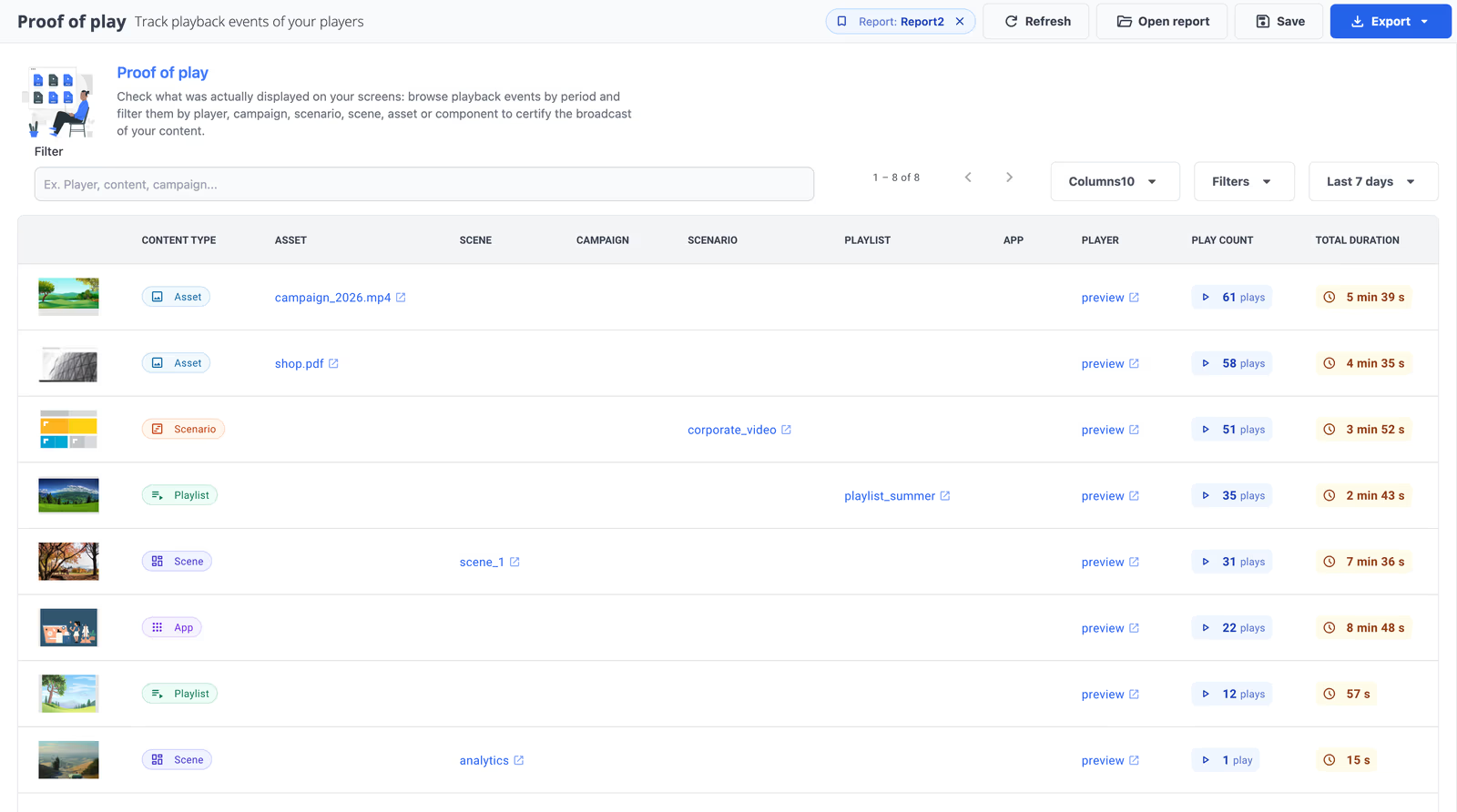
In the analytics section of the Disign studio, the proof of play view lists every content that played on your screens over the chosen period, with its play count and total playback duration. Filter it down to exactly what you need to certify.
Filter by what matters to you
- Player
- Asset
- Scene
- Component
- Campaign
- Scenario
- Playlist
- App
- Period
Play count
How many times each content was displayed.
Total duration
The cumulated time the content was on screen.
Choose the columns to display, search by player, content or campaign, and open any content or digital signage player in one click to preview it.
Complete tracking
Every content type is in the proof of play, down to each scene component
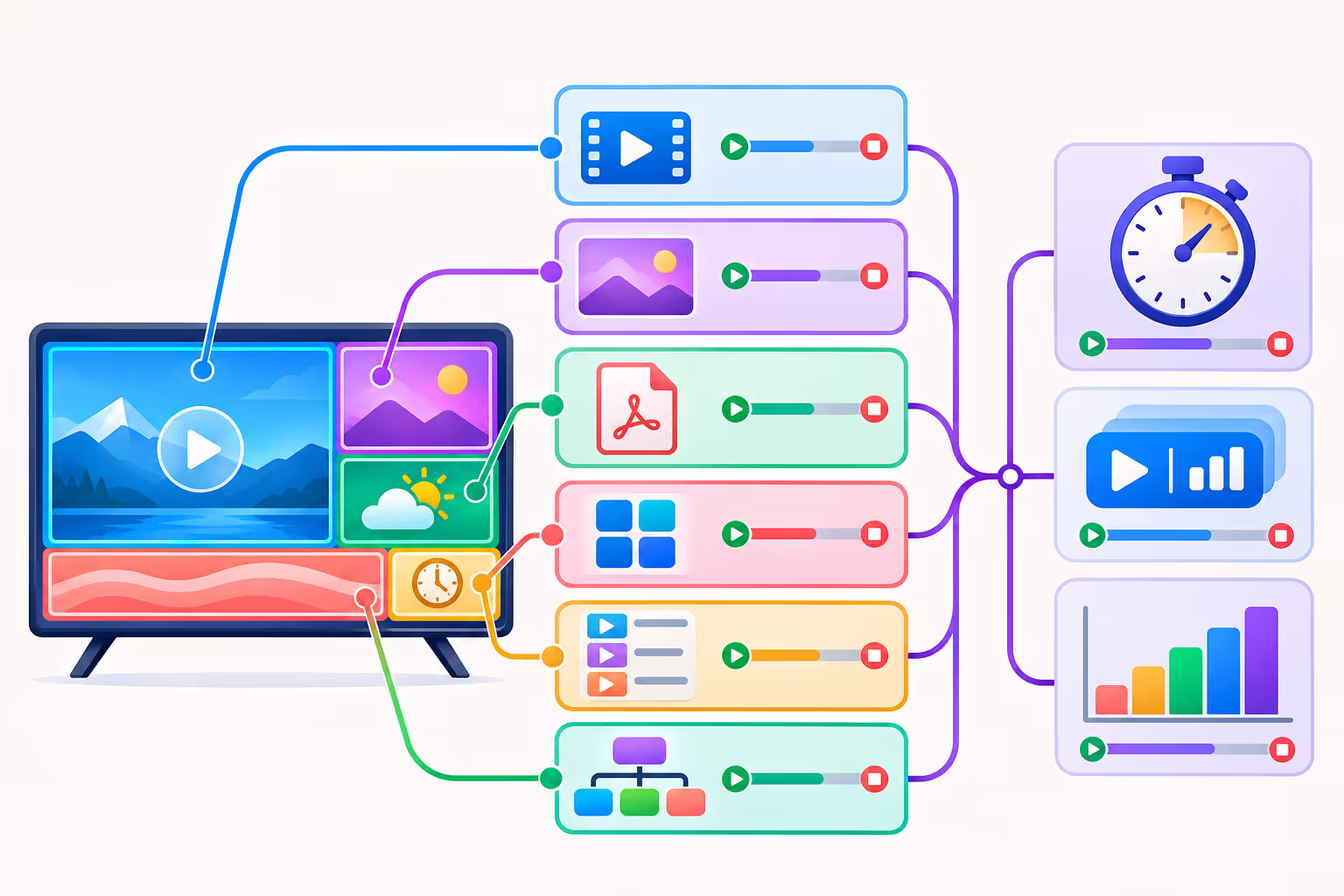
A screen rarely shows a single file. Disign tracks the whole structure of what you broadcast, so your reports reflect what the audience really saw.
Assets
Videos, images, PDF documents: each media file has its own figures.
Scenes and their components
A scene and every component inside it (video, image, text, widget) are counted separately.
Playlists and scenarios
Know how often a playlist or a scenario ran, and for how long, in addition to the content inside it.
Apps
Dynamic content from digital signage apps is tracked like any other content.
Saved reports
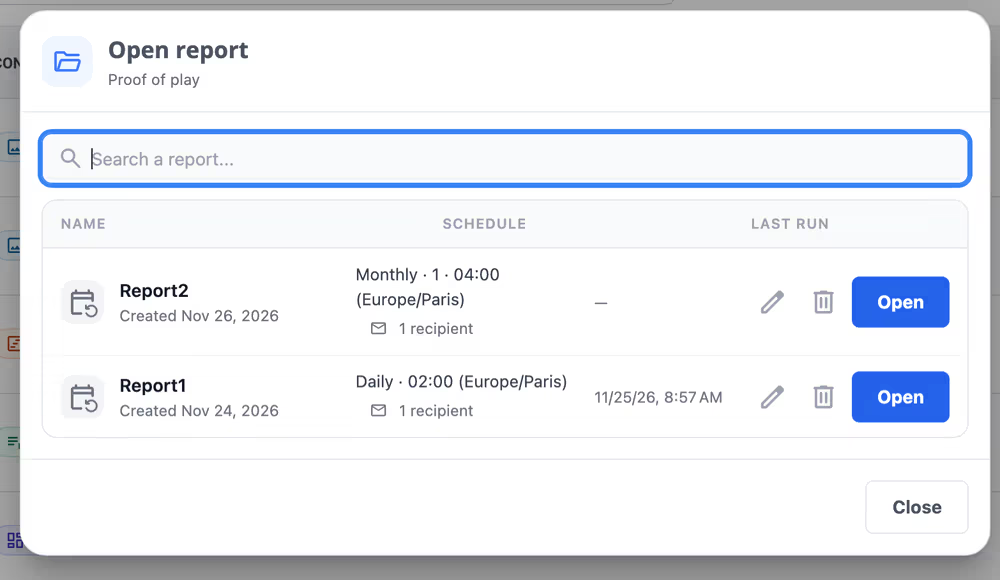
Save your proof of play report once, reopen it in one click
A report keeps everything you configured: filters, period, displayed columns, data and sort order. The next time, open it and see at a glance the figures that matter to you, without rebuilding anything.
- 1
Filter
Pick the players, contents, campaigns and the period.
- 2
Choose columns and sort
Show only the data you need, in the order you want.
- 3
Save the report
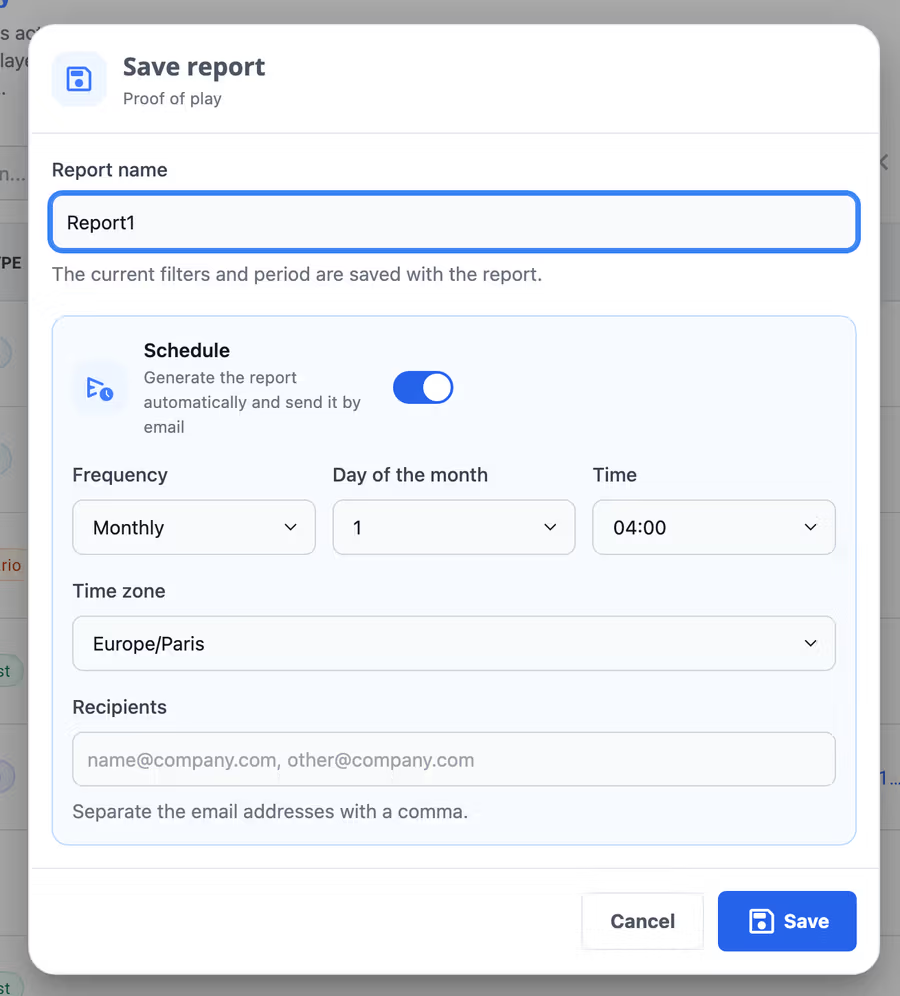
Give it a name, and optionally a schedule.
- 4
Reopen in one click
Find all your reports in one list and open them instantly.
Exports
Export detailed proof of play reports to CSV, Excel or PDF
Export directly from the Disign studio, in the format your recipients expect. The export follows your filters, columns and sort order.
CSV for your tools
Raw, lightweight data to import into your BI, billing or reporting tools.
Excel for analysis
A spreadsheet ready to sort, filter and pivot by player, campaign or period.
PDF to share
A clean document to send to an advertiser, a manager or an auditor.
Scheduled reports
Schedule your proof of play exports and get notified by email
Turn any saved report into an automatic export. Disign generates the CSV, Excel or PDF file on schedule and emails the recipients as soon as it is available. Nobody has to remember to pull the figures at the end of the month.
Daily
At the time you choose.
Weekly
On the day of the week you pick.
Monthly
On a set day of the month.
- Set the time and the time zone of each report.
- Add one or several email recipients, inside or outside your company.
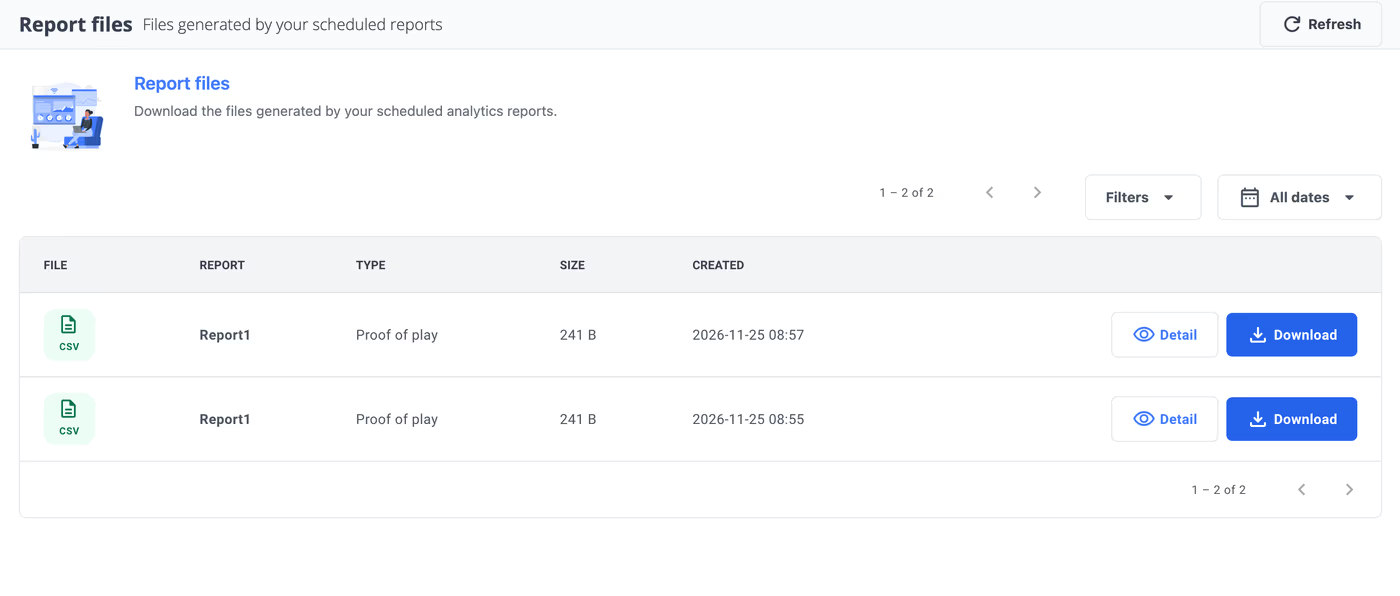
- Find every generated file in the Report files list, ready to download.

Report files: all your exports in one place
Every file generated by a scheduled report is listed with its report name, type, size and creation date. Filter by date, check the details or download it again whenever you need it.
Raw data
Analytics event logs: every event of your screens
Next to proof of play, the analytics event logs section of Disign lets you retrieve all the analytics events associated with your screens. It is the detailed, event-by-event view behind your digital signage analytics, for teams who want to run their own analysis.
Combined with screen monitoring and player logs, you get a complete picture: what played, and in what condition each screen was.
You decide
Enable proof of play player by player
Proof of play can be turned on or off for each player. Activate it on the screens where you need to certify the broadcast, such as advertising screens or safety displays, and leave it off elsewhere.
It works with the players already managed in your digital signage CMS: no extra hardware, no extra software to install on the screen.
Use cases
Digital signage proof of play use cases
From advertising networks to factory floors, proof of play answers the same need: showing, with facts, that a message reached its audience.

Billing advertisers on a DOOH network
Send each advertiser a monthly PDF with the plays and airtime of their campaign on your digital out-of-home (DOOH) screens.
Brand and trade marketing in stores
Prove to suppliers that their co-funded promotion ran on the retail digital signage of every store in the operation.
Safety messages on production sites
Keep a scheduled Excel export showing that safety instructions were displayed on manufacturing digital signage, for your QSE audits.
Multi-site corporate campaigns
Check that an announcement from management reached every office of your corporate digital signage network, site by site.
Sponsors in waiting rooms
Report to partners and sponsors how often their message appeared on waiting room screens.
Passenger information and ads in transport
Combine service information and advertising on transportation digital signage and prove the airtime of each.
Everything you need to know about digital signage proof of play
Play counts, durations, reports, exports and scheduling: the answers to the most common questions.
What is proof of play in digital signage?
Proof of play is the record of what was actually displayed on your digital signage screens. For each content, it tells you how many times it played, its total playback duration, on which players, and when each playback started and ended.
Is Disign proof of play based on the schedule or on real playbacks?
It is based on real playbacks. Each playback is recorded by the player when the content is displayed, then collected by the Disign platform. It is not a simulation built from the schedule, nor an estimate declared by the screen network operator.
Why is proof of play useful for an advertising network?
It lets the network prove to each advertiser that the campaign ran as sold. Disign acts as a trusted third party: the figures come from the screens themselves, and you can send them as a CSV, Excel or PDF report.
Which contents are tracked in proof of play?
Assets (videos, images, PDF documents), scenes and each component inside them, playlists, scenarios and apps. You can filter the results by player, content, campaign, scenario, scene, playlist, app or component.
Can I save a proof of play report?
Yes. A saved report keeps your filters, period, displayed columns, data and sort order. You can reopen it in one click from the list of your reports.
In which formats can I export proof of play data?
You can export proof of play reports to CSV, Excel and PDF directly from the Disign studio.
Can proof of play reports be generated automatically?
Yes. You can schedule a report daily, weekly or monthly, with a defined day, time and time zone. The generated files are available in the Report files list and the recipients are notified by email as soon as a report is ready.
Can I enable proof of play only on some screens?
Yes. Proof of play can be enabled or disabled player by player, so you only collect broadcast data where you need it.
What is the difference between proof of play and analytics event logs?
Proof of play gives consolidated figures per content: play count and total duration. Analytics event logs give you every analytics event associated with your screens, one by one, for your own detailed analysis.

Stop estimating. Prove what played on your screens.
Play counts, durations, start and end of every message, scenes, playlists, scenarios and apps included: Disign proof of play gives your teams and your clients reliable broadcast data, in saved, exported and scheduled reports. Check the digital signage pricing or talk to us about your project.